
How to Rank on Google Maps in Pakistan
Sharing is Caring!

How to Rank on Google Maps in Pakistan
If you’ve ever searched “salon near me” in Gulberg or “dentist near me” in Clifton, you’ve seen the three businesses Google shows before anything else — the Map Pack. Those three spots capture roughly half of all clicks on that search, which means the businesses below them are often invisible in practice, even if they show up further down the page.
I’m Azeem Ahmad, and getting a business into that Map Pack is some of the most practical, high-return work I do for clients across Karachi, Lahore, Islamabad, and other cities in Pakistan. Here’s exactly how it works.
Step 1: Claim and Verify Your Google Business Profile
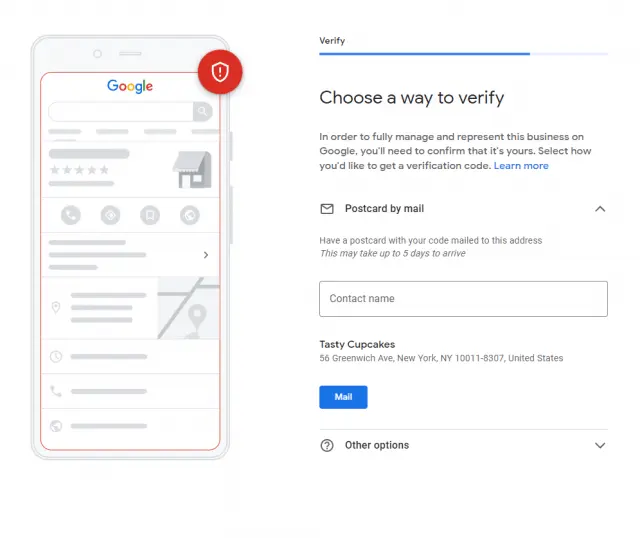
Everything starts here — without a claimed, verified profile, ranking on Maps isn’t possible at all. Search for your business at business.google.com and either claim your existing listing or create a new one.
Verification has changed recently. Rather than the postcard-by-mail process many people remember, Google now primarily verifies new Pakistani listings through a short video: a continuous, unedited clip starting outside your business showing the entrance and any visible signage, then moving inside to show the interior, and ending with you logging into your Google Business Profile dashboard on the same device. It doesn’t need to be professionally shot — a normal phone recording in good lighting is exactly what Google is looking for. This step trips up a lot of business owners simply because they don’t know it’s required, so it’s worth doing carefully the first time.
Step 2: Get Your Category and Basic Information Right
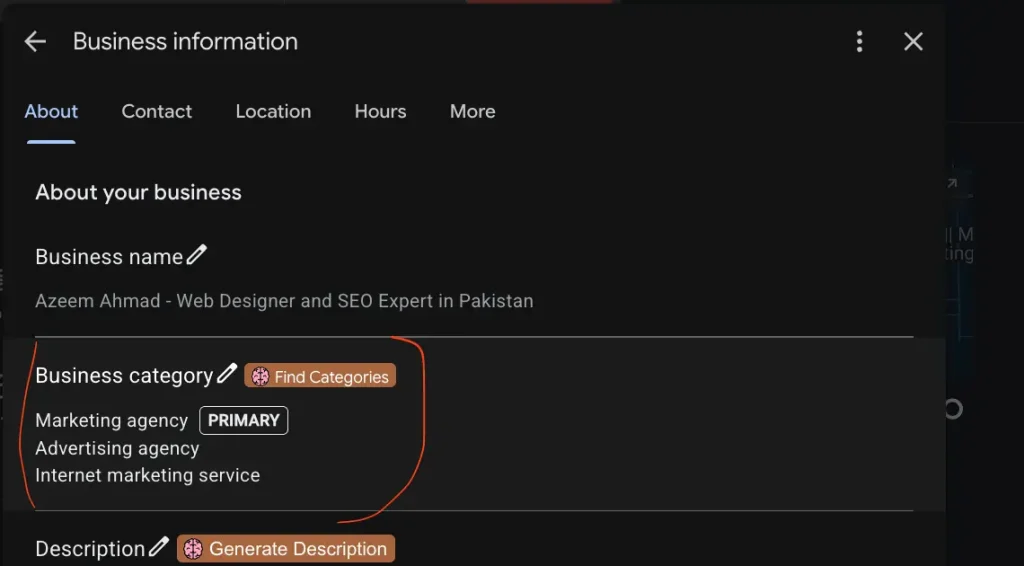
Your primary category is one of the most consequential choices you’ll make, since it directly tells Google what kind of business you are and which searches you should appear for. Choose the most accurate primary category available, and add relevant secondary categories to capture related searches — a bakery might also add “Dessert Shop,” for instance.
Keep your business name exactly as it appears on your signage and paperwork. Adding extra keywords to your listed name (something like “Ahmed’s Salon — Best Salon in Lahore”) is against Google’s guidelines and risks your listing being suspended, even though it’s a tactic some Pakistani businesses still try.
Make sure your Name, Address, and Phone number (often shortened to NAP) match exactly across your Google profile, your website, and any other directory listing your business. Inconsistent information across these sources quietly undermines trust in ways that are hard to notice until you specifically look for them.
Step 3: Understand What Google is Actually Ranking You On
Google has been fairly direct about the three factors behind Maps rankings: relevance (how well your profile matches the search), distance (how close you are to the person searching), and prominence (how established and trusted Google considers your business, based on signals like reviews and consistent listings elsewhere online).
You can’t change your business’s physical location, but a business slightly farther away with a genuinely strong, complete profile regularly outranks a closer one with a thin, neglected listing. This is genuinely good news if your business isn’t in the most central part of a neighborhood — strong prominence signals can meaningfully offset distance.
Step 4: Build a Genuine Review Base
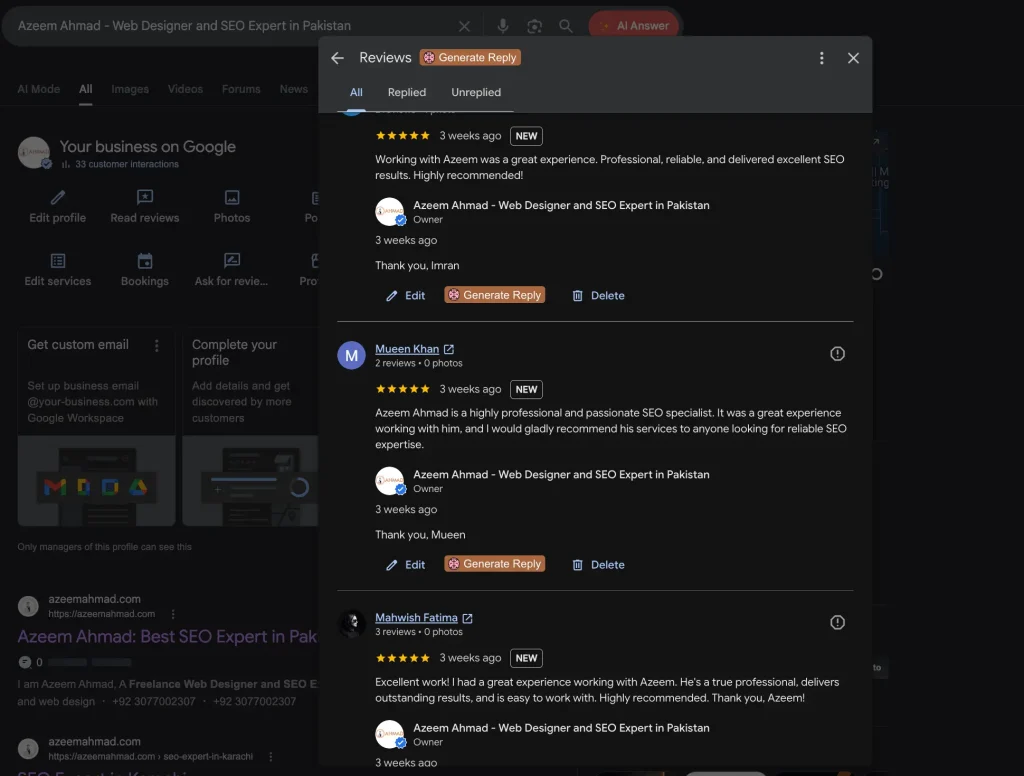
Reviews are one of the strongest prominence signals Google uses, and in Pakistan, the most effective way to collect them tends to be personal, not automated. A short, specific WhatsApp message after a completed service — something as simple as thanking the customer by name and including your review link directly — consistently outperforms generic requests. A printed QR code at your counter or on receipts works well too.
Respond to every review you receive. For positive reviews, a specific reply (mentioning what the customer actually said) reads as more genuine than a generic “thank you.” For negative reviews, respond within a day if possible, acknowledge the issue without getting defensive, and offer a real resolution — how a business handles criticism publicly says as much to future customers as the review itself.
One thing worth being direct about: never buy fake reviews. Google actively detects unnatural review patterns, and the consequences — reduced visibility or full suspension — are far more costly than the short-term boost is worth.
Step 5: Build Local Citations the Right Way
Citations are mentions of your business (ideally with consistent NAP details) across other websites and directories. In Pakistan, the most valuable citations tend to be industry-specific rather than generic: real estate businesses benefit from listings on platforms like Zameen.com and Graana.com, restaurants from Foodpanda and Cheetay, and most local businesses from established Pakistani business directories relevant to their category.
Aim for a reasonable number of genuinely relevant, accurate citations rather than chasing a large volume of low-quality ones — thirty to fifty solid, consistent listings tend to do more for your ranking than several hundred scattered, inconsistent ones.
Step 6: Support Your Maps Ranking With Your Website
Google uses your website to verify and reinforce what your Google Business Profile claims. A fast, mobile-friendly website with accurate, matching information lifts your Maps ranking; a slow or inconsistent one quietly holds it back. Given that mobile devices account for the large majority of internet use in Pakistan, this matters more here than it might in a market where more browsing happens on desktop.
If your business operates in more than one city — say, Karachi and Lahore, or Islamabad and Faisalabad — build a dedicated page for each location, with the city clearly in the page’s heading, your full address, and an embedded map, rather than trying to rank one generic page for every location at once.
Step 7: Keep the Profile Active
A Google Business Profile that’s set up once and never touched again tends to lose ground over time to competitors who are actively maintaining theirs. Adding photos regularly, posting updates or offers, and promptly answering questions asked directly on your profile all signal to Google that your business is genuinely active — which factors into how much Google trusts and promotes your listing.
FAQs
How long does it take to rank on Google Maps in Pakistan?
With consistent effort, most businesses see initial movement within a few months, and stronger, more stable results build over 3 to 6 months. Highly competitive categories in dense areas take longer than less crowded ones.
Do I need a website to rank on Google Maps?
Not strictly, but it helps significantly. Your website reinforces and verifies the information on your Google Business Profile, and a well-optimized one measurably improves how well your listing performs.
What’s the biggest mistake Pakistani businesses make with Google Maps?
Leaving the profile incomplete after initial setup — missing categories, few or no photos, no posts, and reviews left unanswered. A profile that’s fully filled out and actively maintained consistently outperforms one that’s merely claimed and verified.
Can I rank in more than one city on Google Maps?
Yes, but each location needs its own genuine profile and, ideally, its own dedicated page on your website — a single listing or page trying to represent multiple cities at once tends to perform poorly in all of them.